🎁 Free Shipping on all Orders — Valid Through Dec 31, 2026

Sleep Mask with Bluetooth: Complete Guide to Better Sleep & Travel

Sleep Mask with Bluetooth: The Complete Guide to Comfortable Sleep, Relaxation and Travel
Getting quality rest can be difficult when your surroundings are not ideal. Bright lights, early morning sunlight, hotel rooms, airplane cabins, roommates, partners watching television, and other distractions can make it harder to create a comfortable environment for relaxation.
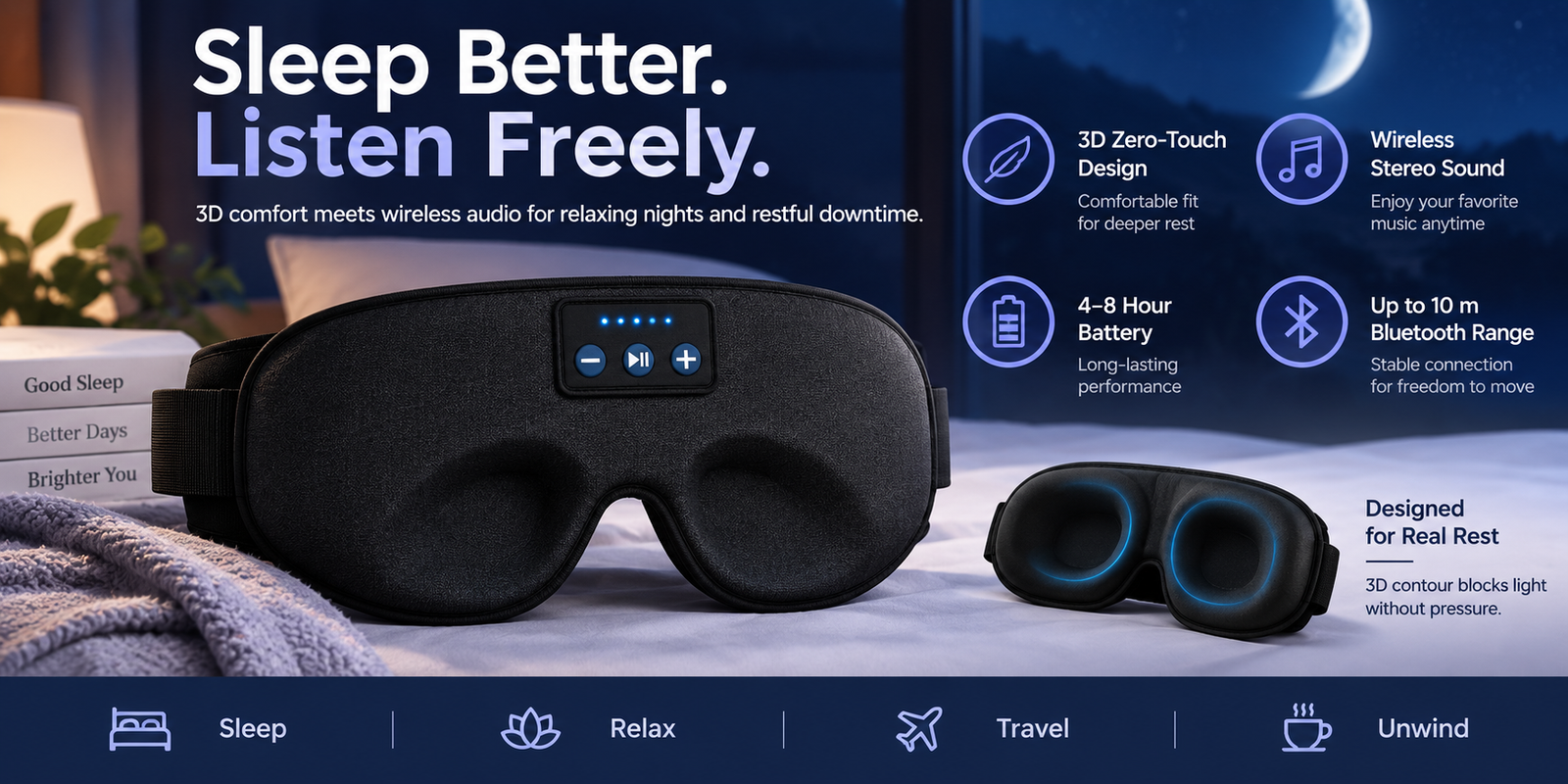
A Sleep Mask with Bluetooth combines two useful functions in one wearable product: a traditional sleep mask that helps reduce exposure to light and built-in wireless headphones that allow you to listen to audio from a compatible device.
Instead of wearing a separate eye mask and earbuds or headphones, a Bluetooth sleep mask provides a more convenient way to create a personal relaxation environment. Depending on the design, you can use it for sleeping, power naps, meditation, travel, relaxation, reading audio content, podcasts, white noise, nature sounds, and other activities.
If you are looking for a convenient sleep mask with Bluetooth headphones, the JAP Global Store Sleep Mask with Bluetooth Headphones is designed around this combination of light blocking and wireless audio.
In this detailed guide, we will explain what a Bluetooth sleep mask is, how it works, how to use one, its potential benefits, who may find it useful, what to look for before buying, cleaning and maintenance tips, and frequently asked questions.
What Is a Sleep Mask with Bluetooth?
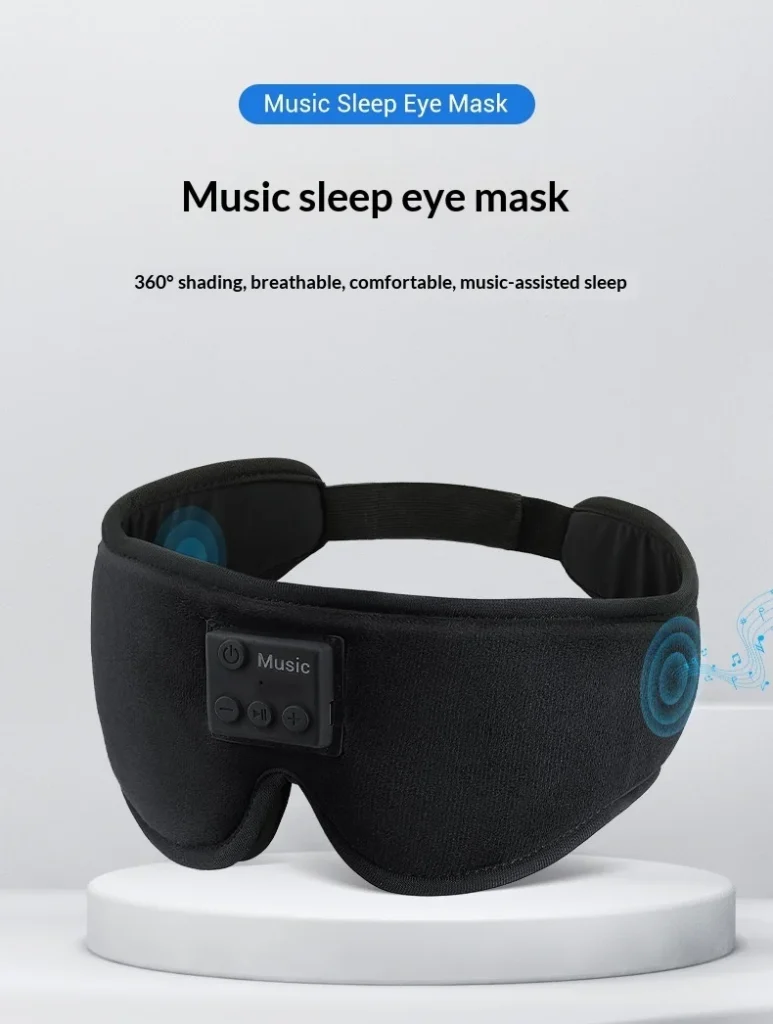
A Sleep Mask with Bluetooth is an eye mask that incorporates wireless Bluetooth audio components into the mask.
A conventional sleep mask primarily covers the eyes to reduce exposure to surrounding light. A Bluetooth sleep mask adds built-in speakers or headphones, allowing the wearer to connect the mask wirelessly to a smartphone, tablet, laptop, or another compatible Bluetooth-enabled device.
This means you can combine: Sleep Mask with Bluetooth
- Light-blocking coverage
- Wireless audio
- Music
- Podcasts
- Audiobooks
- Meditation audio
- White noise
- Nature sounds
- Relaxing soundtracks
into one wearable product.
Bluetooth sleep masks are particularly interesting for people who do not like wearing traditional earbuds while resting. Instead of placing separate earphones inside the ears, the speakers are incorporated into the mask around the ear area. Different products use different speaker designs, thicknesses, padding, and positioning, so comfort can vary from one model to another.
How Does a Bluetooth Sleep Mask Work?
A Bluetooth sleep mask generally contains small wireless speakers connected to an internal Bluetooth module.
The basic process is simple: Sleep Mask with Bluetooth
- Charge the Bluetooth component.
- Turn on the sleep mask.
- Activate Bluetooth on your smartphone or other device.
- Find the mask in the Bluetooth device list.
- Pair the devices.
- Start your preferred audio.
- Put the mask over your eyes.
- Adjust the strap for a comfortable fit.
- Relax and enjoy your selected audio.
Once paired, many Bluetooth sleep masks can reconnect with a previously paired device when the mask is turned on and the device’s Bluetooth is active.
Exact pairing names, controls, battery capacity, charging time, and operating functions vary by product, so always check the instructions supplied with your specific mask.
Why Choose a Sleep Mask with Bluetooth?
One of the biggest advantages of a Bluetooth sleep mask is convenience.
Normally, someone who wants darkness and audio might use an eye mask together with earbuds or headphones. That can create several separate items to manage. This distinction is important which rarely available with amazon and Walmart store.
A Bluetooth sleep mask combines the two functions. Sleep Mask with Bluetooth
1. Combines an Eye Mask and Headphones
The most obvious advantage is the two-in-one design.
Instead of purchasing and wearing:
- A separate eye mask
- Separate earbuds
- Separate headphones
you can use one wearable product designed to provide both light-blocking coverage and wireless audio.
This can make your nighttime or relaxation routine simpler.
2. Helps Reduce Exposure to Light
Light can be an unwanted distraction when you are trying to rest during the daytime, while traveling, or in a room where you cannot control the lighting.
A sleep mask is designed to cover the eyes and reduce the amount of ambient light reaching them.
The exact amount of light blocked depends on the mask’s construction, fit, nose area, fabric, and your individual facial shape. Therefore, it is better to think of a sleep mask as a way to reduce unwanted light, rather than assuming that every model provides identical blackout performance.
3. Listen Without Traditional Earbuds
Some people find traditional earbuds uncomfortable when lying down. Sleep Mask with Bluetooth
A Bluetooth sleep mask places the speakers within the mask rather than requiring conventional earbuds inserted into the ears.
This can be particularly useful for people who prefer a less intrusive audio setup.
Products in this category commonly use thin or padded speakers positioned near the ears, although speaker construction varies considerably between models.
4. Useful for Travel
Travel is one of the most practical situations for a Bluetooth eye mask.
You may encounter:
- Airplane cabin lighting
- Hotel room lighting
- Early morning sunlight
- Different sleeping schedules
- Noise from other passengers
- Unfamiliar sleeping environments
A sleep mask can help reduce visual distractions while Bluetooth audio gives you another option for personal entertainment or relaxation.
For frequent travelers, a compact two-in-one product can also reduce the number of separate accessories that need to be packed.
5. Useful for Power Naps
You do not have to use a Bluetooth sleep mask only at night.
It can also be used during a short daytime nap. Sleep Mask with Bluetooth
For example, you could connect your phone and listen to relaxing music, ambient sounds, a meditation track, or a podcast while using the mask to reduce surrounding light.
6. Create a Personal Relaxation Routine
A consistent bedtime routine can make it easier to transition from daily activities into a period of relaxation.
A Bluetooth sleep mask can become part of that routine.
For example: Sleep Mask with Bluetooth
Dim the lights → put your phone aside → wear the mask → start relaxing audio → close your eyes → relax.
The objective is not to rely on a gadget as a guaranteed solution for sleep, but to create a comfortable environment that supports your personal relaxation habits.
Sleep Mask with Bluetooth vs. Traditional Sleep Mask
Both products have the same basic purpose of covering the eyes, but a Bluetooth model adds wireless audio functionality.
| Feature | Traditional Sleep Mask | Sleep Mask with Bluetooth |
|---|---|---|
| Covers eyes | Yes | Yes |
| Reduces ambient light | Yes | Yes |
| Built-in speakers | No | Usually |
| Bluetooth connectivity | No | Yes |
| Music streaming | No | Yes |
| Podcasts | No | Yes |
| Meditation audio | No | Yes |
| White noise | No | Often possible through connected device |
| Requires separate headphones | Usually if audio is desired | No |
| Travel use | Yes | Yes |
| Nap use | Yes | Yes |
A traditional mask may be preferable for someone who wants the simplest possible product. Sleep Mask with Bluetooth
A Sleep Mask with Bluetooth, however, may be more appealing to someone who wants both light reduction and wireless audio in one product.
What Can You Listen to With a Bluetooth Sleep Mask?
One of the most useful aspects of a Bluetooth sleep mask is that the audio possibilities depend largely on your connected device and the applications you use.
You could potentially listen to: Sleep Mask with Bluetooth
1. Relaxing Music
Soft instrumental music or other relaxing playlists can be used as part of a bedtime routine.
The important consideration is volume. Keep audio at a comfortable, moderate level rather than playing it unnecessarily loud.
2. White Noise
White noise is commonly used to create a consistent background sound.
If your environment contains occasional distracting sounds, continuous audio may help make those changes in the environment less noticeable.
3. Nature Sounds
Rain, ocean waves, forests, streams, wind, and other nature-inspired recordings are popular relaxation options.
You can play these through your smartphone or another Bluetooth-enabled device.
4. Meditation Audio
Guided meditation, breathing exercises, mindfulness recordings, and relaxation sessions can be convenient when you do not want to look at your phone screen.
The sleep mask can cover your eyes while the audio guides you through the session.
5. Podcasts
A Bluetooth sleep mask can also function as a wireless listening device for podcasts.
This can be useful when you want to listen without holding your phone or wearing separate earbuds.
6. Audiobooks
Audiobooks are another potential use.
However, if you are using an audiobook specifically to help you fall asleep, consider using a sleep timer in your audiobook application so that audio does not continue unnecessarily throughout the night.
How to Use a Sleep Mask with Bluetooth
Using a Bluetooth sleep mask is generally straightforward. Sleep Mask with Bluetooth
Step 1: Charge the Mask
Before using the product for the first time, charge its electronic module according to the manufacturer’s instructions.
Charging requirements can vary between models, so use the supplied charging cable and follow the included instructions.
Some comparable Bluetooth sleep masks advertise several hours of continuous playback, but battery performance varies by model, volume level, Bluetooth implementation, battery condition, and usage.
Step 2: Turn On Bluetooth on Your Phone
Open the Bluetooth settings on your smartphone, tablet, or compatible device.
Make sure Bluetooth is enabled.
Step 3: Turn On the Sleep Mask
Press and hold the power button according to the product instructions.
Many Bluetooth audio devices enter pairing mode when they are first powered on or when the power button is held for several seconds.
Step 4: Find the Mask in Bluetooth Settings
Look through the list of available Bluetooth devices.
The name shown can vary according to the model.
Select the sleep mask when it appears. Sleep Mask with Bluetooth
Step 5: Complete Pairing
Wait for the phone and mask to establish the connection.
Once paired, open your preferred music, podcast, meditation, audiobook, or white-noise application.
Step 6: Test the Audio
Before going to sleep, play a short audio clip.
Check that the speakers are positioned correctly near your ears and that the volume is comfortable.
Step 7: Adjust the Mask
Place the mask over your eyes.
Adjust the strap so that the mask stays securely in position without feeling unnecessarily tight.
The mask should be comfortable rather than restrictive.
Step 8: Start Your Relaxation Routine
Once everything is adjusted, you can close your eyes and begin your chosen audio.
For sleeping, consider using a timer if your phone or audio application provides one.
Best Ways to Use a Bluetooth Sleep Mask
A Bluetooth sleep mask is not limited to nighttime sleeping. Sleep Mask with Bluetooth
Here are several practical ways to use it.
At Home
Use it as part of your normal bedtime routine.
You can listen to relaxing music, meditation audio, white noise, podcasts, or audiobooks while reducing unwanted light.
During a Daytime Nap
If sunlight makes it difficult to relax during the day, the mask can help create a darker environment.
This can be particularly convenient for people who have irregular schedules.
While Traveling
Airplanes, trains, buses, hotels, and other travel environments can have unpredictable lighting.
A sleep mask can help reduce visual distractions, while Bluetooth audio gives you a convenient way to listen to your own content.
During Meditation
Put on the mask, connect your device, and select a guided meditation.
Removing visual distractions may help you concentrate on the audio session.
During Relaxation
Even if you are not planning to sleep, the product can be used while lying down and listening to calm audio.
Is a Sleep Mask with Bluetooth Good for Side Sleepers?
This depends heavily on the design and your personal sleeping position. Sleep Mask with Bluetooth
Some Bluetooth sleep masks are specifically designed with thin speakers or padded ear areas to make them more comfortable for side sleepers. Several products in this category emphasize thin or cushioned speaker construction for this reason.
However, everyone’s head shape, pillow firmness, and sleeping position are different.
If you sleep on your side, pay particular attention to:
- Speaker thickness
- Speaker position
- Ear cushioning
- Mask thickness
- Strap design
- Pillow type
- Overall weight
A mask that feels comfortable while standing may feel different when your head is pressed against a pillow.
For the best experience, test the fit while lying in your usual sleeping position.
How to Choose the Right Sleep Mask with Bluetooth
Before buying a Bluetooth sleep mask, consider the following factors. Sleep Mask with Bluetooth
1. Light Blocking
Look for a design that provides good coverage around the eyes and nose.
Light can enter through gaps around the sides or nose area if the mask does not fit your face properly.
2. Speaker Design
Speaker thickness is important, especially if you sleep on your side.
Thin speakers and adequate padding can make the product more comfortable.
3. Bluetooth Compatibility
Make sure the mask works with your smartphone, tablet, or other Bluetooth-enabled device.
Most modern Bluetooth audio accessories are designed for broad device compatibility, but always check the product specifications.
4. Battery Life
Consider how long you expect to use the mask between charges.
If you want to use it throughout the night, look for a battery capacity that matches your intended usage.
Comparable products advertise battery life ranging from several hours to more than 10 hours, demonstrating why battery specifications should be checked for the exact model you are purchasing.
5. Comfort
Comfort should be one of the most important considerations.
Look for:
- Soft fabric
- Breathable construction
- Adjustable strap
- Comfortable eye area
- Proper speaker placement
- Lightweight construction
6. Washability
Because a sleep mask comes into contact with your face regularly, cleaning is important.
If the mask contains removable electronics, check the manufacturer’s instructions before washing.
Never assume an electronic module is waterproof or machine washable.
Some comparable Bluetooth sleep masks specifically provide removable electronic modules so the fabric can be washed, but this feature varies by product.
7. Controls
Easy-to-use buttons can be useful. Sleep Mask with Bluetooth
Depending on the model, controls may allow you to:
- Turn the device on/off
- Play/pause audio
- Adjust volume
- Change tracks
- Answer calls
The exact controls vary by model.
How to Maintain Your Sleep Mask with Bluetooth
Proper maintenance can help keep your sleep mask comfortable and functional.
Keep the electronic components dry
Do not expose the Bluetooth module to unnecessary moisture.
Follow the manufacturer’s washing instructions
If the electronic components are removable, remove them before cleaning the fabric if the instructions specify this.
Keep the charging port clean
Dust and debris can interfere with charging.
Store it properly
When not in use, keep the mask in a clean, dry location.
Avoid pulling the wires or speakers
If the speakers are integrated into the fabric, avoid unnecessarily stretching or pulling the internal components.
Charge safely
Use the recommended charging cable and power source and follow the supplied instructions.
Safety Tips When Using a Bluetooth Sleep Mask
A Bluetooth sleep mask is an electronic wearable product, so a few basic precautions are sensible.
Keep the volume comfortable
Listening at excessive volume can be harmful to hearing.
Use a moderate volume level, especially when listening for extended periods.
Do not use a damaged device
Stop using the product if the electronic components, charging cable, or battery appear damaged.
Do not cover your nose or mouth
A sleep mask should cover the eyes, not interfere with normal breathing.
Keep electronic components away from water
Unless the manufacturer specifically states that a component is water-resistant, keep it dry.
Follow the product manual
Different Bluetooth sleep masks have different charging, washing, pairing, and operating instructions.
The manufacturer’s instructions should take priority over generic advice.
Sleep Mask with Bluetooth for Travel
Travel is one of the strongest use cases for a Bluetooth eye mask.
Imagine sitting on a long flight during the day. The cabin lights may be on, other passengers may be moving around, and you may want to relax.
Instead of packing:
- Eye mask
- Earbuds
- Headphone case
- Separate audio accessories
a two-in-one Bluetooth sleep mask can simplify your travel kit. Sleep Mask with Bluetooth
You can connect it to your smartphone, choose your preferred audio, put the mask on, and relax.
It can also be useful in hotels where curtains do not completely block morning sunlight.
Sleep Mask with Bluetooth for Meditation
Meditation often involves reducing external distractions.
A Bluetooth sleep mask can combine visual darkness with guided audio.
For example:
- Sit or lie comfortably.
- Put your phone on silent or Do Not Disturb if appropriate.
- Connect the Bluetooth sleep mask.
- Select a guided meditation.
- Put the mask over your eyes.
- Adjust the volume.
- Follow the audio instructions.
This can create a simple, repeatable meditation setup without requiring separate headphones and an eye mask.
Sleep Mask with Bluetooth for Partners Sharing a Bedroom
People who share a bedroom may have different schedules and preferences.
One person may want to sleep while the other wants to read, watch something, or stay awake.
A Bluetooth sleep mask can provide the wearer with their own audio environment while the mask helps reduce exposure to light.
This does not eliminate all environmental noise, but it can be a convenient personal relaxation accessory.
What Makes a Bluetooth Sleep Mask Different From Bluetooth Earbuds?
Bluetooth earbuds are designed primarily for audio. Sleep Mask with Bluetooth
A Bluetooth sleep mask combines audio with eye coverage.
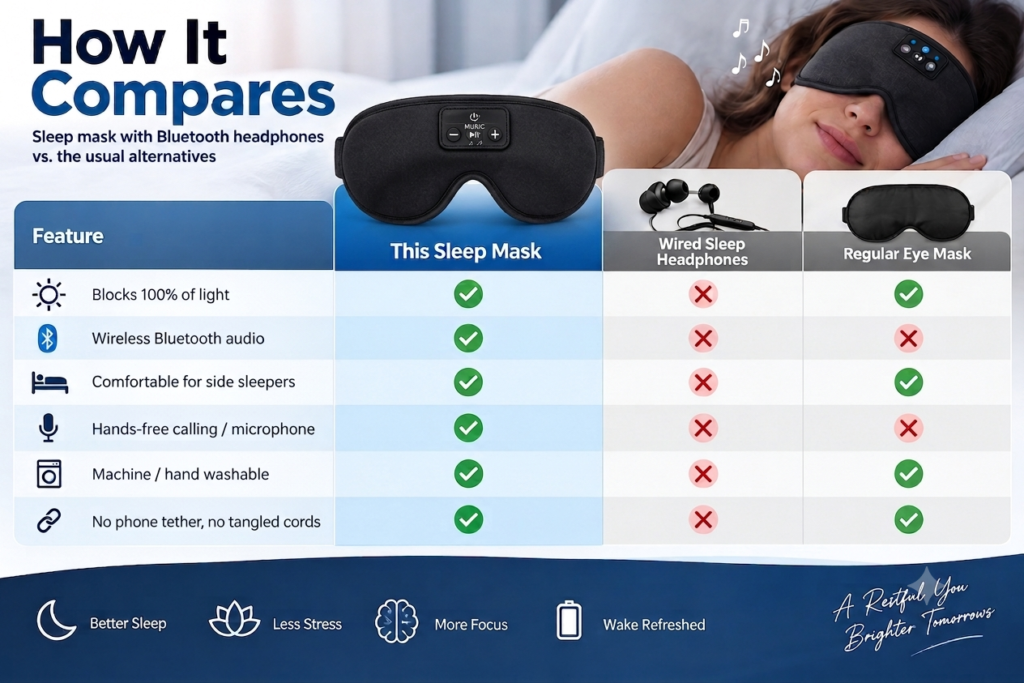
| Bluetooth Earbuds | Bluetooth Sleep Mask |
|---|---|
| Audio-focused | Audio + eye coverage |
| Inserted in or around ears | Speakers integrated into mask |
| Can be easy to lose | One combined wearable |
| Does not block light | Covers eyes |
| Designed for many activities | Especially useful for rest, naps and travel |
| May be uncomfortable for some sleepers | Designed around sleep-mask use |
Neither product is universally better. The choice depends on what you want from your nighttime or relaxation setup.
If your main goal is high-quality portable audio for exercise, calls, or general listening, earbuds may be more suitable.
If you specifically want light reduction and wireless audio together, a Bluetooth sleep mask may be more convenient.
Who Can Use a Sleep Mask with Bluetooth?
A Bluetooth sleep mask can be useful for a variety of adults, including:
Frequent travelers
Useful for airplanes, hotels and other unfamiliar environments.
Daytime nappers
Helpful when you need to rest while daylight is still present.
Podcast listeners
Convenient for listening without traditional earbuds.
Meditation enthusiasts
Can combine guided audio with reduced visual distractions.
People who enjoy relaxing audio
Music, ambient sound and nature recordings can be played through the built-in speakers.
People who want a two-in-one accessory
A Bluetooth sleep mask combines two common accessories into one product.
Frequently Asked Questions
What is a Sleep Mask with Bluetooth?
A Sleep Mask with Bluetooth is an eye mask with integrated wireless audio components. It can connect to compatible Bluetooth devices so you can listen to music, podcasts, meditation, audiobooks, white noise, or other audio while wearing the mask.
Can I connect a Bluetooth sleep mask to my phone?
Generally, yes. Bluetooth sleep masks are designed to connect to compatible Bluetooth-enabled smartphones and other devices. Pairing steps and device names depend on the specific model.
Can I listen to music with a Bluetooth sleep mask?
Yes. After pairing the mask with a compatible device, you can typically play music through the integrated speakers.
Can I listen to podcasts?
Yes. Podcasts are one of the convenient uses for a Bluetooth sleep mask because the audio can play wirelessly from your connected device.
Can I use it for meditation?
Yes. You can connect the mask to a smartphone or tablet and play guided meditation, breathing exercises, nature sounds, or other relaxing audio.
Is a Bluetooth sleep mask suitable for travel?
Yes. The combination of an eye mask and wireless audio makes this type of product particularly convenient for travel, including flights, hotels, trains and daytime journeys.
Can I sleep on my side while wearing one?
Some Bluetooth sleep masks are specifically designed with thin or padded speakers for side sleeping. However, comfort depends on the specific design and your sleeping position.
Does a Bluetooth sleep mask block all light?
Light-blocking performance varies according to the design and fit. A well-fitted mask can significantly reduce unwanted ambient light, but the exact level of blackout depends on the product and individual face shape.
Does a Bluetooth sleep mask require Wi-Fi?
No. Bluetooth itself does not require Wi-Fi. You can connect the mask directly to a compatible Bluetooth device. However, internet access may be required to stream online content depending on the application you are using.
Can I use it without Bluetooth?
The answer depends on the specific model. Some Bluetooth sleep masks may have built-in controls or other audio functions, while others primarily operate through a Bluetooth connection. Check the product’s instructions for exact functionality.
How long does the battery last?
Battery life varies by model and usage. Comparable Bluetooth sleep masks advertise several hours of continuous playback, with some models offering approximately 8–13 hours or more. Actual performance depends on volume, battery condition and other factors.
How do I clean a Bluetooth sleep mask?
Follow the manufacturer’s cleaning instructions. If the product has a removable electronic module, remove it before washing only if the manufacturer specifically instructs you to do so.
Can I wear it for a daytime nap?
Yes. A sleep mask can be useful for daytime naps because it reduces exposure to ambient light.
Can I use it on an airplane?
Yes. A Bluetooth sleep mask can be used for personal listening and light reduction during travel, provided that you follow the airline’s electronic-device and Bluetooth rules.
Is a Bluetooth sleep mask the same as Bluetooth headphones?
Not exactly. Bluetooth headphones are primarily audio devices. A Bluetooth sleep mask combines wireless audio with an eye mask.
Can I listen to an audiobook through it?
Yes, provided the mask supports Bluetooth audio and is successfully paired with your phone or another compatible device.
Is a Bluetooth sleep mask good for relaxation?
It can be a useful relaxation accessory because it combines reduced visual stimulation with personal audio. You can use relaxing music, meditation, nature sounds, podcasts or other preferred audio.
Tips for Getting the Most From Your Bluetooth Sleep Mask
To make your experience more comfortable, consider these simple tips.
Start with a comfortable volume
Do not begin with unnecessarily loud audio. Start low and increase only if needed.
Adjust the strap carefully
The mask should stay in position without feeling too tight.
Position the speakers correctly
Before settling down, make sure the speakers are aligned comfortably with your ears.
Use a sleep timer
If your audio application supports a timer, consider using it when you only want audio while falling asleep.
Keep your phone at a comfortable distance
After pairing, you can place your phone somewhere convenient rather than keeping it directly beside your face.
Keep the mask clean
Regular cleaning according to the manufacturer’s instructions helps maintain hygiene.
Test it before a long trip
If you plan to use it on an airplane or during a long journey, pair and test it at home first.
Why a Sleep Mask with Bluetooth Can Be a Convenient Two-in-One Accessory
Modern lifestyles often involve multiple devices and accessories.
You might use:
- A smartphone for music
- Earbuds for audio
- An eye mask for darkness
- A travel pouch for accessories
A Bluetooth sleep mask combines some of these functions into one wearable accessory.
Its main appeal is not that it magically guarantees better sleep. Rather, it provides a practical way to reduce visual distractions while listening to your preferred audio without needing separate headphones.
For people who enjoy music, podcasts, meditation, white noise or audiobooks, this combination can make a nighttime or relaxation routine more convenient.
Final Thoughts: Is a Sleep Mask with Bluetooth Worth Considering?
A Sleep Mask with Bluetooth is a practical combination of an eye mask and wireless audio accessory.
It can be useful for:
- Nighttime relaxation
- Daytime naps
- Travel
- Airplane journeys
- Meditation
- Listening to podcasts
- Audiobooks
- White noise
- Nature sounds
- Relaxing music
The biggest advantage is convenience. Instead of using a separate sleep mask and headphones, you can combine the two functions into one wearable product.
When choosing a Bluetooth sleep mask, pay attention to comfort, light coverage, speaker design, Bluetooth compatibility, battery life, adjustability, cleaning requirements and overall construction.
If you are looking for a convenient way to combine darkness and wireless audio, explore the Sleep Mask with Bluetooth Headphones from JAP Global Store and see whether its design fits your relaxation, sleep and travel routine.
Ready to combine light blocking and wireless audio in one accessory? Explore the Sleep Mask with Bluetooth Headphones at JAP Global Store.